 PX4 Build Bot
6e906e1fde
PX4 Build Bot
6e906e1fde
* New translations xml_schema.md (Korean)

[ci skip]

* New translations xml_schema.md (Chinese Simplified)

[ci skip]

* New translations offboard_control.md (Korean)

[ci skip]

* New translations parameter.md (Korean)

[ci skip]

* New translations component_metadata.md (Korean)

[ci skip]

* New translations offboard_control.md (Chinese Simplified)

[ci skip]

* New translations parameter.md (Chinese Simplified)

[ci skip]

* New translations component_metadata.md (Chinese Simplified)

[ci skip]

* New translations parameter.md (Korean)

[ci skip]

* New translations component_metadata.md (Korean)

[ci skip]

* New translations parameter.md (Chinese Simplified)

[ci skip]

* New translations component_metadata.md (Chinese Simplified)

[ci skip]

* New translations faq.md (Korean)

[ci skip]

* New translations index.md (Korean)

[ci skip]

* New translations illuminator.md (Korean)

[ci skip]

* New translations image_transmission.md (Korean)

[ci skip]

* New translations mavlink_id_assignment.md (Korean)

[ci skip]

* New translations parameter_ext.md (Korean)

[ci skip]

* New translations arm_authorization.md (Korean)

[ci skip]

* New translations camera.md (Korean)

[ci skip]

* New translations camera_def.md (Korean)

[ci skip]

* New translations gimbal_v2.md (Korean)

[ci skip]

* New translations faq.md (Chinese Simplified)

[ci skip]

* New translations index.md (Chinese Simplified)

[ci skip]

* New translations illuminator.md (Chinese Simplified)

[ci skip]

* New translations image_transmission.md (Chinese Simplified)

[ci skip]

* New translations mavlink_id_assignment.md (Chinese Simplified)

[ci skip]

* New translations parameter_ext.md (Chinese Simplified)

[ci skip]

* New translations arm_authorization.md (Chinese Simplified)

[ci skip]

* New translations camera.md (Chinese Simplified)

[ci skip]

* New translations camera_def.md (Chinese Simplified)

[ci skip]

* New translations gimbal_v2.md (Chinese Simplified)

[ci skip]

* New translations development.md (Korean)

[ci skip]

* New translations matrixpilot.md (Korean)

[ci skip]

* New translations ardupilotmega.md (Korean)

[ci skip]

* New translations asluav.md (Korean)

[ci skip]

* New translations common.md (Korean)

[ci skip]

* New translations dialects.md (Korean)

[ci skip]

* New translations development.md (Chinese Simplified)

[ci skip]

* New translations matrixpilot.md (Chinese Simplified)

[ci skip]

* New translations ardupilotmega.md (Chinese Simplified)

[ci skip]

* New translations asluav.md (Chinese Simplified)

[ci skip]

* New translations common.md (Chinese Simplified)

[ci skip]

* New translations dialects.md (Chinese Simplified)

[ci skip]

* New translations minimal.md (Korean)

[ci skip]

* New translations minimal.md (Chinese Simplified)

[ci skip]

* New translations standard.md (Korean)

[ci skip]

* New translations stemstudios.md (Korean)

[ci skip]

* New translations standard.md (Chinese Simplified)

[ci skip]

* New translations stemstudios.md (Chinese Simplified)

[ci skip]

* New translations uavionix.md (Korean)

[ci skip]

* New translations uavionix.md (Chinese Simplified)

[ci skip]

* New translations development.md (Korean)

[ci skip]

* New translations matrixpilot.md (Korean)

[ci skip]

* New translations ardupilotmega.md (Korean)

[ci skip]

* New translations asluav.md (Korean)

[ci skip]

* New translations common.md (Korean)

[ci skip]

* New translations mission.md (Korean)

[ci skip]

* New translations development.md (Chinese Simplified)

[ci skip]

* New translations matrixpilot.md (Chinese Simplified)

[ci skip]

* New translations ardupilotmega.md (Chinese Simplified)

[ci skip]

* New translations asluav.md (Chinese Simplified)

[ci skip]

* New translations common.md (Chinese Simplified)

[ci skip]

* New translations mission.md (Chinese Simplified)

[ci skip]

* New translations minimal.md (Korean)

[ci skip]

* New translations minimal.md (Chinese Simplified)

[ci skip]

* New translations standard.md (Korean)

[ci skip]

* New translations stemstudios.md (Korean)

[ci skip]

* New translations standard.md (Chinese Simplified)

[ci skip]

* New translations stemstudios.md (Chinese Simplified)

[ci skip]

* New translations uavionix.md (Korean)

[ci skip]

* New translations uavionix.md (Chinese Simplified)

[ci skip]

* New translations dialects.md (Korean)

[ci skip]

* New translations dialects.md (Chinese Simplified)

[ci skip]

* New translations common.md (Korean)

[ci skip]

* New translations dialects.md (Korean)

[ci skip]

* New translations common.md (Chinese Simplified)

[ci skip]

* New translations dialects.md (Chinese Simplified)

[ci skip]
7.3 KiB
Image Transmission Protocol
:::warning The Camera Protocol and MAVLink FTP are recommended for sending images, video and files.
This protocol is not intended for general image transmission use (it was originally designed as a simple protocol for transferring small images over a low bandwidth channel from an optical flow sensor to a GCS). :::
The image transmission protocol uses MAVLink as the communication channel to transport any kind of image (raw images, Kinect data, etc.) from one MAVLink node to another. It basically takes a live camera image, splits it into small chunks and sends it over MAVLink.
This topic describes how the image streaming functionality works and covers both the communication protocol and implementation details (for a vehicle and QGroundControl).
Communication
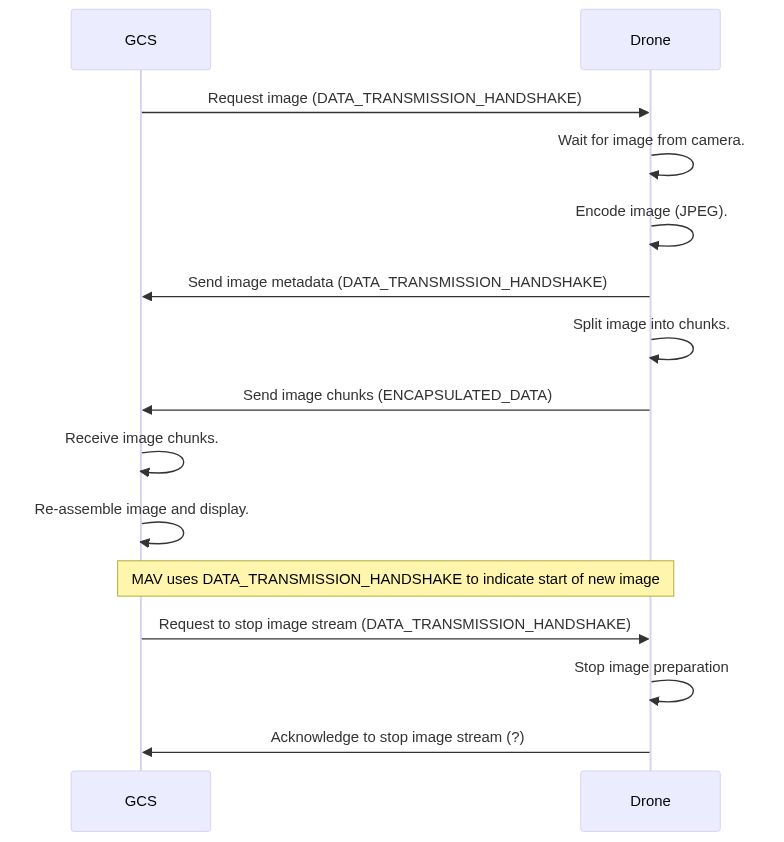
The image streaming component uses two MAVLink messages: a handshake message, DATA_TRANSMISSION_HANDSHAKE, to initiate image streaming and describe the image to be sent, and a data container message, ENCAPSULATED_DATA, to transport the image data.
-
The communication is initiated by the QGroundControl with a
DATA_TRANSMISSION_HANDSHAKErequest to start the stream. The messages should specify:type: any of the types in the enum MAVLINK_DATA_STREAM_TYPE in mavlink.h,jpg_quality: Desired image quality (for lossy formats like JPEG).- All other fields must be zero in the initial request.
-
When the targeted MAV receives the handshake request, it sends back a
DATA_TRANSMISSION_HANDSHAKE. This acts provides acknowledgment of the request and information about the image that is about to be streamed:type: Type of image to be streamed (same as requested type)size: Image size in bytes.width: Image width in pixels.height: Image height in pixels.packets: number of MAVLinkENCAPSULATED_DATApackets to be sentpayload: Size of the payload of each data packet (normally 252 bytes)jpg_quality: Image quality (same as requested)
-
The image data is then split into chunks to fit into
ENCAPSULATED_DATAmessage and sent over MAVLink. Every packet contains a sequence number as well as the ID of the image stream it belongs to. -
The image streamer periodically sends new images without further interaction. Every new image comes with a new
DATA_TRANSMISSION_HANDSHAKEACK packet with updated imagesize,packetsandpayloadfields. After this ACK packet, the new image arrives as a series ofENCAPSULATED_DATApackets.::: info The sequence number starts at 0 for every new image of the stream. :::
-
To stop an image stream a GCS must send a new
DATA_TRANSMISSION_HANDSHAKErequest packet, with all 0 values. The MAVLink node will acknowledge this by sending backDATA_TRANSMISSION_HANDSHAKEalso containing 0 values.
Usage / Configuration
To use the two modules on your MAV, you have to do the following steps:
-
Start at least these components on the MAV:
px_mavlink_bridge_udp & px_system_control --heartbeat & px_camera -o lcm & -
Compile and start QGroundControl.
-
Start the image streaming component (you can add the
-vflag to see some more output):px_imagestreamer. -
Initiate the image stream: Open the HUD widget, right-click into the widget and choose Enable live Image Streaming.
You should now be able to see the live video feed with one image per second (default, hardcoded at the moment).
Developer
Out-of-the-box, the image streaming component only implements JPEG streaming of the camera image. To implement your own image stream, you have to do the following:
- Write a MAVLink handler, which handles requests to start image streams of your type of choice.
- Write a data handler, which takes your desired data (i.e. a stereo camera image), encodes it into the format of your choice (i.e. rawimage, JPEG, BMP) and splits/sends the data over MAVLink.
- Extend the data/message handler in the UAS component of QGroundControl to correctly handle your data (i.e. unpacking of the chosen format).
- Write or extend a widget to display your data according to your wishes.