mirror of
https://github.com/0xJacky/nginx-ui.git
synced 2026-06-19 07:36:59 +00:00
 Hintay
f6992d8789
Hintay
f6992d8789
* test(self_check): add fixed-default bundled nginx-ui.conf fixture

* test(self_check): add unfixed-default bundled nginx-ui.conf fixture

* test(self_check): add customized and partial-fix fixtures

* feat(self_check): add error codes for bundled nginx-ui.conf upgrade

* feat(self_check): add CheckBundledNginxUIConf

* feat(self_check): add idempotent applyBundledConfPatch

* feat(self_check): add transactional patch-on-disk with backup restore

* feat(self_check): wire FixBundledNginxUIConf with verify+reload

* feat(self_check): register bundled nginx-ui.conf WS-fix task

* test(docker): add init-config bats fixtures

* feat(docker): hash-whitelist sync for bundled nginx-ui.conf

* feat(docker): seed nginx-ui.conf known-hashes list

* chore(docker): add maintainer script for nginx-ui.conf hash list

* ci(docker): add bats + hash-consistency workflow for init-config.sh

* feat(docker): ship nginx-ui.conf known-hashes inside the image

* feat(self-check): banner button shows Fix when all failures are fixable

* docs: add docker websocket fix guide (en)

* docs: add docker websocket fix guide (zh_CN, zh_TW)

* docs: link docker-websocket-fix page in all locale sidebars

* docs(readme): link docker websocket fix guide

* docs(readme): link docker websocket fix guide (translations)

* fix(self_check): WS-fix check independent of NGINX_UI_IGNORE_DOCKER_SOCKET

* fix(docker): respect bundled nginx host mode

Keep bundled nginx-ui.conf self-checks aligned with Docker host mode and prevent config sync failures from blocking startup.

* fix(docker): tighten bundled conf review fixes

Co-authored-by: Jacky <me@jackyu.cn>

---------

Co-authored-by: Cursor Agent <cursoragent@cursor.com>
Co-authored-by: Jacky <me@jackyu.cn>
391 lines
16 KiB
Markdown
391 lines
16 KiB
Markdown
<div align="center">
|
||
<img src="/resources/logo.png" alt="Nginx UI Logo">
|
||
</div>
|
||
|
||
# Nginx UI
|
||
|
||
もう一つのNginx Web UI [0xJacky](https://jackyu.cn/), [Hintay](https://blog.kugeek.com/), [Akino](https://github.com/akinoccc)によって開発されました。
|
||
|
||
[](https://deepwiki.com/0xJacky/nginx-ui)
|
||
|
||
[](https://github.com/0xJacky/nginx-ui/actions/workflows/build.yml)
|
||
[](https://github.com/0xJacky/nginx-ui "Click to view the repo on Github")
|
||
[](https://github.com/0xJacky/nginx-ui/releases/latest "Click to view the repo on Github")
|
||
[](https://github.com/0xJacky/nginx-ui "Click to view the repo on Github")
|
||
[](https://github.com/0xJacky/nginx-ui "Click to view the repo on Github")
|
||
[](https://github.com/0xJacky/nginx-ui "Click to view the repo on Github")
|
||
[](https://github.com/0xJacky/nginx-ui/issues "Click to view the repo on Github")
|
||
|
||
[](https://hub.docker.com/r/uozi/nginx-ui "Click to view the image on Docker Hub")
|
||
[](https://hub.docker.com/r/uozi/nginx-ui "Click to view the image on Docker Hub")
|
||
[](https://hub.docker.com/r/uozi/nginx-ui "Click to view the image on Docker Hub")
|
||
|
||
[](https://weblate.nginxui.com/engage/nginx-ui/)
|
||
[](https://hellogithub.com/repository/86f3a8f779934748a34fe6f1b5cd442f)
|
||
|
||
## ドキュメント
|
||
公式ドキュメントは [nginxui.com](https://nginxui.com) を参照してください。
|
||
|
||
## スター推移
|
||
|
||
[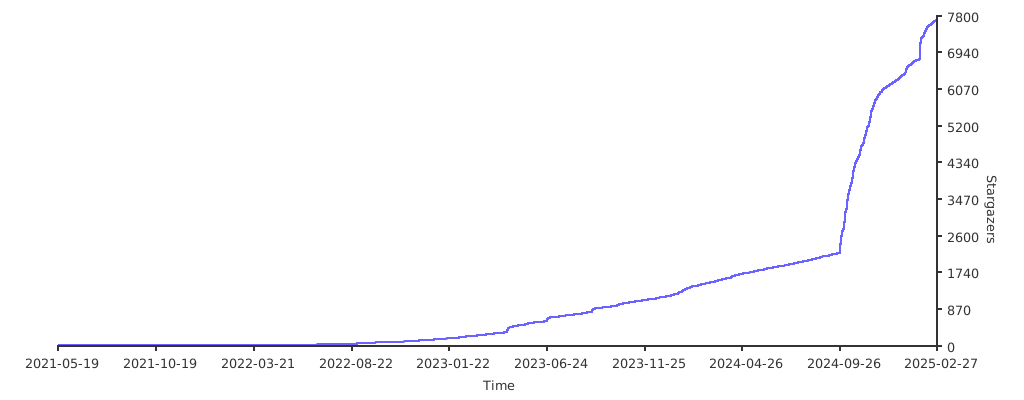](https://starchart.cc/0xJacky/nginx-ui)
|
||
|
||
[English](../../README.md) | [Español](README-es.md) | [简体中文](README-zh_CN.md) | [繁體中文](README-zh_TW.md) | [Tiếng Việt](README-vi_VN.md) | [日本語](README-ja_JP.md)
|
||
|
||
<details>
|
||
<summary>目次</summary>
|
||
<ol>
|
||
<li>
|
||
<a href="#about-the-project">プロジェクトについて</a>
|
||
<ul>
|
||
<li><a href="#demo">デモ</a></li>
|
||
<li><a href="#features">機能</a></li>
|
||
<li><a href="#internationalization">多言語化</a></li>
|
||
</ul>
|
||
</li>
|
||
<li>
|
||
<a href="#getting-started">はじめに</a>
|
||
<ul>
|
||
<li><a href="#before-use">使用前の注意</a></li>
|
||
<li><a href="#installation">インストール</a></li>
|
||
<li>
|
||
<a href="#usage">使い方</a>
|
||
<ul>
|
||
<li><a href="#from-executable">実行ファイルから</a></li>
|
||
<li><a href="#with-systemd">Systemdで</a></li>
|
||
<li><a href="#with-docker">Dockerで</a></li>
|
||
</ul>
|
||
</li>
|
||
</ul>
|
||
</li>
|
||
<li>
|
||
<a href="#manual-build">手動ビルド</a>
|
||
<ul>
|
||
<li><a href="#prerequisites">前提条件</a></li>
|
||
<li><a href="#build-app">フロントエンドのビルド</a></li>
|
||
<li><a href="#build-backend">バックエンドのビルド</a></li>
|
||
</ul>
|
||
</li>
|
||
<li>
|
||
<a href="#script-for-linux">Linux用スクリプト</a>
|
||
<ul>
|
||
<li><a href="#basic-usage">基本的な使い方</a></li>
|
||
<li><a href="#more-usage">その他の使い方</a></li>
|
||
</ul>
|
||
</li>
|
||
<li><a href="#example-of-nginx-reverse-proxy-configuration">Nginx リバースプロキシ設定例</a></li>
|
||
<li><a href="#contributing">貢献方法</a></li>
|
||
<li><a href="#license">ライセンス</a></li>
|
||
</ol>
|
||
</details>
|
||
|
||
## プロジェクトについて
|
||
|
||

|
||
|
||
### デモ
|
||
URL:[https://demo.nginxui.com](https://demo.nginxui.com)
|
||
- ユーザー名:admin
|
||
- パスワード:admin
|
||
|
||
### 機能
|
||
|
||
- CPU 使用率、メモリ使用率、ロードアベレージ、ディスク使用率などのサーバー指標をオンラインで確認可能
|
||
- 設定変更時に自動でバックアップを作成し、バージョン比較や復元に対応
|
||
- 複数ノード間での設定ミラーリングをサポートし、マルチサーバー環境を容易に管理可能
|
||
- 暗号化された Nginx / Nginx UI の設定をエクスポートし、新しい環境への迅速なデプロイや復旧が可能
|
||
- オンライン ChatGPT アシスタントを搭載。DeepSeek-R1 の Chain-of-Thought 表示に対応し、設定の理解と最適化を支援
|
||
- MCP(Model Context Protocol)で AI エージェントが Nginx UI と連携するための専用インターフェースを提供し、設定管理やサービス制御の自動化を実現
|
||
- Let’s Encrypt 証明書の発行および自動更新をワンクリックで実行可能
|
||
- 自社開発の **NgxConfigEditor**(ブロックエディタ)および、LLM によるコード補完と nginx 設定のシンタックスハイライトに対応した **Ace Code Editor** を搭載
|
||
- Web UI 上から Nginx ログを直接確認可能
|
||
- Go と Vue で実装され、単一の実行バイナリとして配布
|
||
- 設定保存時に設定テストを自動実行し、成功時のみ nginx を再読み込み
|
||
- Web ターミナル
|
||
- ダークモード対応
|
||
- レスポンシブデザイン
|
||
|
||
### 多言語化
|
||
|
||
下記の言語を公式でサポートしています:
|
||
- 英語
|
||
- 簡体字中国語
|
||
- 繁體字中国語
|
||
|
||
|
||
非ネイティブによる翻訳のため、不自然な表現が含まれている可能性があります。
|
||
お気づきの点がございましたら、ぜひフィードバックをお寄せください。
|
||
|
||
コミュニティのご協力により、他の言語の翻訳も多数提供されています。
|
||
翻訳にご参加いただける方は、[Weblate](https://weblate.nginxui.com) をご覧ください。
|
||
|
||
|
||
## はじめに
|
||
|
||
### 使用前の注意
|
||
|
||
Nginx UI は、Debian 系 Web サーバーの設定ファイル構成標準に準拠しています。
|
||
作成されたサイト設定ファイルは、自動的に検出された Nginx の設定ディレクトリ内の `sites-available` に配置されます。
|
||
有効化されたサイトについては、`sites-enabled` にシンボリックリンクが作成されます。
|
||
|
||
Debian 系以外のディストリビューション(Ubuntu を除く)を使用している場合は、以下の例を参考に `nginx.conf` を Debian スタイルの構成に変更してください。
|
||
|
||
```nginx
|
||
http {
|
||
# ...
|
||
include /etc/nginx/conf.d/*.conf;
|
||
include /etc/nginx/sites-enabled/*;
|
||
}
|
||
```
|
||
|
||
詳細: [debian/conf/nginx.conf](https://salsa.debian.org/nginx-team/nginx/-/blob/master/debian/conf/nginx.conf#L59-L60)
|
||
|
||
### インストール
|
||
|
||
Nginx UI は以下のプラットフォームで利用可能です:
|
||
|
||
- macOS 11 Big Sur and later (amd64 / arm64)
|
||
- Windows 10 and later (amd64 / arm64)
|
||
- Linux 2.6.23 and later (x86 / amd64 / arm64 / armv5 / armv6 / armv7 / mips32 / mips64 / riscv64 / loongarch64)
|
||
- Including but not limited to Debian 7 / 8, Ubuntu 12.04 / 14.04 and later, CentOS 6 / 7, Arch Linux
|
||
- FreeBSD
|
||
- OpenBSD
|
||
- Dragonfly BSD
|
||
- Openwrt
|
||
|
||
|
||
最新リリースは[リリースページ](https://github.com/0xJacky/nginx-ui/releases/latest)からダウンロード、または[Linux用インストールスクリプト](#script-for-linux)を利用
|
||
|
||
|
||
### 使い方
|
||
|
||
初回起動後、ブラウザで`http://<your_server_ip>:<listen_port>`にアクセスし、初期設定を完了してください。
|
||
|
||
#### 実行ファイルから
|
||
**ターミナルでNginx UIを動かす**
|
||
|
||
```shell
|
||
nginx-ui -config app.ini
|
||
```
|
||
`Control+C`で終了します。
|
||
|
||
**バックグラウンドでNginx UIを動かす**
|
||
|
||
```shell
|
||
nohup ./nginx-ui -config app.ini &
|
||
```
|
||
以下のコマンドで Nginx UI を停止します。
|
||
|
||
```shell
|
||
kill -9 $(ps -aux | grep nginx-ui | grep -v grep | awk '{print $2}')
|
||
```
|
||
|
||
#### Systemdで
|
||
[Linuxインストールスクリプト](#script-for-linux)を使うと、`nginx-ui`というsystemdサービスが作成されます。以下コマンドで操作可能:
|
||
|
||
**起動**
|
||
|
||
```shell
|
||
systemctl start nginx-ui
|
||
```
|
||
**停止**
|
||
|
||
```shell
|
||
systemctl stop nginx-ui
|
||
```
|
||
**再起動**
|
||
|
||
```shell
|
||
systemctl restart nginx-ui
|
||
```
|
||
|
||
#### Dockerで
|
||
公式イメージ [uozi/nginx-ui:latest](https://hub.docker.com/r/uozi/nginx-ui) はベースに公式 nginx イメージを利用しています。ホストの Nginx と置き換える形で利用可能です。
|
||
|
||
##### 注意
|
||
1. 初回利用時は `/etc/nginx` にマッピングするボリュームが空であることを確認してください。
|
||
2. 静的ファイルを配信する場合は、適切なディレクトリをマッピングしてください。
|
||
3. If you are upgrading from an older image, see the [Docker WebSocket fix guide](https://nginxui.com/guide/docker-websocket-fix.html) for required `conf.d/nginx-ui.conf` updates.
|
||
|
||
<details>
|
||
<summary><b>Dockerでデプロイ</b></summary>
|
||
|
||
1. [Dockerをインストール](https://docs.docker.com/install/)
|
||
|
||
2. 以下のように実行:
|
||
|
||
```bash
|
||
docker run -dit \
|
||
--name=nginx-ui \
|
||
--restart=always \
|
||
-e TZ=Asia/Shanghai \
|
||
-v /mnt/user/appdata/nginx:/etc/nginx \
|
||
-v /mnt/user/appdata/nginx-ui:/etc/nginx-ui \
|
||
-v /var/run/docker.sock:/var/run/docker.sock \
|
||
-p 8080:80 -p 8443:443 \
|
||
uozi/nginx-ui:latest
|
||
```
|
||
|
||
3. パネルには `[http://<your-ip>:8080/install](http://<your_server_ip>:8080/install)` でアクセスします。
|
||
</details>
|
||
|
||
<details>
|
||
<summary><b>Docker-Composeでデプロイ</b></summary>
|
||
|
||
1. [Docker-Composeをインストール](https://docs.docker.com/compose/install/)
|
||
|
||
2. 以下内容の`docker-compose.yml`を作成:
|
||
|
||
```yml
|
||
services:
|
||
nginx-ui:
|
||
stdin_open: true
|
||
tty: true
|
||
container_name: nginx-ui
|
||
restart: always
|
||
environment:
|
||
- TZ=Asia/Shanghai
|
||
volumes:
|
||
- '/mnt/user/appdata/nginx:/etc/nginx'
|
||
- '/mnt/user/appdata/nginx-ui:/etc/nginx-ui'
|
||
- '/var/www:/var/www'
|
||
- '/var/run/docker.sock:/var/run/docker.sock'
|
||
ports:
|
||
- 8080:80
|
||
- 8443:443
|
||
image: 'uozi/nginx-ui:latest'
|
||
```
|
||
|
||
3. コンテナの起動:
|
||
```bash
|
||
docker compose up -d
|
||
```
|
||
|
||
4. パネルには `[http://<your-ip>:8080/install](http://<your_server_ip>:8080/install)` でアクセスします。
|
||
|
||
</details>
|
||
|
||
## 手動ビルド
|
||
|
||
公式ビルドがないプラットフォーム向けに、以下の手順でビルドできます。
|
||
|
||
### 前提条件
|
||
|
||
- Make
|
||
|
||
- Golang 1.23+
|
||
|
||
- node.js 21+
|
||
|
||
```shell
|
||
npx browserslist@latest --update-db
|
||
```
|
||
|
||
### フロントエンドのビルド
|
||
|
||
`app` ディレクトリで以下を実行:
|
||
|
||
```shell
|
||
pnpm install
|
||
pnpm build
|
||
```
|
||
|
||
### バックエンドのビルド
|
||
|
||
フロントエンドビルド後、プロジェクトルートで:
|
||
|
||
```shell
|
||
go generate
|
||
go build -tags=jsoniter -ldflags "$LD_FLAGS -X 'github.com/0xJacky/Nginx-UI/settings.buildTime=$(date +%s)'" -o nginx-ui -v main.go
|
||
```
|
||
|
||
## Linux用スクリプト
|
||
|
||
### 基本的な使い方
|
||
|
||
**インストール & アップグレード**
|
||
|
||
```shell
|
||
bash -c "$(curl -L https://cloud.nginxui.com/install.sh)" @ install
|
||
```
|
||
デフォルトのリスニングポートは `9000`、HTTP チャレンジ用ポートは `9180` です。
|
||
ポートが競合する場合は `/usr/local/etc/nginx-ui/app.ini` を編集し、`systemctl restart nginx-ui` を実行してください。
|
||
|
||
**設定・DB を残してアンインストール**
|
||
|
||
```shell
|
||
bash -c "$(curl -L https://cloud.nginxui.com/install.sh)" @ remove
|
||
```
|
||
|
||
### その他の使い方
|
||
|
||
````shell
|
||
bash -c "$(curl -L https://cloud.nginxui.com/install.sh)" @ help
|
||
````
|
||
|
||
## Nginx リバースプロキシ設定例
|
||
|
||
```nginx
|
||
server {
|
||
listen 80;
|
||
listen [::]:80;
|
||
|
||
server_name <your_server_name>;
|
||
rewrite ^(.*)$ https://$host$1 permanent;
|
||
}
|
||
|
||
map $http_upgrade $connection_upgrade {
|
||
default upgrade;
|
||
'' close;
|
||
}
|
||
|
||
server {
|
||
listen 443 ssl;
|
||
listen [::]:443 ssl;
|
||
http2 on;
|
||
|
||
server_name <your_server_name>;
|
||
|
||
ssl_certificate /path/to/ssl_cert;
|
||
ssl_certificate_key /path/to/ssl_cert_key;
|
||
|
||
location / {
|
||
proxy_set_header Host $host;
|
||
proxy_set_header X-Real-IP $remote_addr;
|
||
proxy_set_header X-Forwarded-For $proxy_add_x_forwarded_for;
|
||
proxy_set_header X-Forwarded-Proto $scheme;
|
||
proxy_http_version 1.1;
|
||
proxy_set_header Upgrade $http_upgrade;
|
||
proxy_set_header Connection $connection_upgrade;
|
||
proxy_pass http://127.0.0.1:9000/;
|
||
}
|
||
}
|
||
```
|
||
|
||
## 貢献方法
|
||
|
||
オープンソースコミュニティへの貢献は **大歓迎** です。
|
||
改善提案がある場合は、リポジトリをフォークし、プルリクエストを作成してください。
|
||
Issue に「enhancement」タグを付けて提案することもできます。
|
||
スターもぜひお願いします。
|
||
|
||
1. リポジトリをフォーク
|
||
2. フィーチャーブランチ作成 (`git checkout -b feature/AmazingFeature`)
|
||
3. 変更をコミット (`git commit -m 'Add some AmazingFeature'`)
|
||
4. ブランチをプッシュ (`git push origin feature/AmazingFeature`)
|
||
5. プルリクエストを作成
|
||
|
||
## コミュニティ
|
||
|
||
Nginx UI 公式 WeChat コミュニティグループへぜひご参加ください。利用方法、デプロイ構成、トラブルシューティングについて他のユーザーと交流できます。
|
||
|
||
以下の QR コードを WeChat で読み取り、申請時に `Nginx UI Community Group` と記載してください。管理者が公式コミュニティグループへ招待します。
|
||
|
||
<p align="center">
|
||
<img src="../../docs/public/assets/wechat-community-qr.png" alt="Nginx UI WeChat Community QR Code" width="320">
|
||
</p>
|
||
|
||
## ライセンス
|
||
|
||
本プロジェクトは GNU Affero General Public License v3.0 に基づき配布されています。ライセンスの詳細は [LICENSE](LICENSE) ファイルをご覧ください。
|