 Jacky
69cfa82b1d
Jacky
69cfa82b1d
* feat(cert): add self-signed certificate type and config to model

Co-Authored-By: Claude Opus 4.7 (1M context) <noreply@anthropic.com>

* feat(cert): generate self-signed leaf certificates

Add GenerateSelfSigned / SelfSignedOptions plus five new error codes
(50032-50036) and a full TDD test suite covering valid cert output,
multiple key types, empty-SAN rejection, and invalid-IP rejection.

Co-Authored-By: Claude Opus 4.7 (1M context) <noreply@anthropic.com>

* feat(cert): regenerate self-signed certificates with key reuse

Add RegenerateSelfSigned, SelfSignedOptionsFromModel, deriveSelfSignedCommonName,
loadSelfSignedKey, and parsePrivateKeyPEM to support re-issuing self-signed
certificates for the auto-renewal job, reusing the on-disk private key when possible.

Co-Authored-By: Claude Opus 4.7 (1M context) <noreply@anthropic.com>

* feat(cert): add self-signed certificate renewal worker

Add auto-renewal worker for self-signed certificates that mirrors the
ACME renewal logic, using a dedicated shouldRenewSelfSignedCert threshold
function verified with TDD.

Co-Authored-By: Claude Opus 4.7 (1M context) <noreply@anthropic.com>

* feat(cron): schedule self-signed certificate renewal

Register setupSelfSignedCertRenewalJob as a periodic cron job (every
30 minutes) in InitCronJobs, mirroring the existing setupAutoCertJob
pattern.

Co-Authored-By: Claude Opus 4.7 (1M context) <noreply@anthropic.com>

* feat(api): add self-signed certificate generation endpoints

Co-Authored-By: Claude Opus 4.7 (1M context) <noreply@anthropic.com>

* feat(cert): add self-signed certificate frontend API

Co-Authored-By: Claude Opus 4.7 (1M context) <noreply@anthropic.com>

* feat(cert): add shared self-signed certificate fields component

Co-Authored-By: Claude Opus 4.7 (1M context) <noreply@anthropic.com>

* feat(cert): add self-signed certificate generation modal and list entry

Co-Authored-By: Claude Opus 4.7 (1M context) <noreply@anthropic.com>

* feat(cert): support self-signed certificates in the editor

Co-Authored-By: Claude Opus 4.7 (1M context) <noreply@anthropic.com>

* feat(site): generate self-signed certificates from the site editor

Extract hasTLSListen/ensureDirective/ensureTLSDirectives into a shared
useTLSDirectives composable, refactor ObtainCert.vue to use it, and add
SelfSignedCert.vue to the site cert tab so users can generate and apply
a self-signed certificate directly from the site editor.

Co-Authored-By: Claude Opus 4.7 (1M context) <noreply@anthropic.com>

* fix(cert): validate self-signed key type and name IP-only renewals

Co-Authored-By: Claude Opus 4.7 (1M context) <noreply@anthropic.com>

* refactor(cert): apply code-review cleanup

- reuse certcrypto.ParsePEMPrivateKey instead of a hand-rolled PEM
  private-key parser
- stop exporting the unused ensureDirective from useTLSDirectives
- use the AutoCertState enum instead of integer literals in certColumns
- allocate the renewal Logger only when renewal is attempted, avoiding a
  per-tick goroutine and empty-log database write for non-due certificates

Co-Authored-By: Claude Opus 4.7 (1M context) <noreply@anthropic.com>

* fix(cert): address PR #1688 review feedback

- clean up the partial certificate directory when the initial write
  fails, not just the database row
- log a warning when the existing self-signed private key cannot be
  reused so operators notice the public-key fingerprint has changed
- defensively copy the model's Domains and IPAddresses slices in
  SelfSignedOptionsFromModel
- require an explicit "Save now" confirmation after generating from the
  site editor, and write the directives into the editor first so the
  user can review the diff before saving

Co-Authored-By: Claude Opus 4.7 (1M context) <noreply@anthropic.com>

* fix(cert): harden self-signed certificate lifecycle

Reuse private keys on manual self-signed edits, make certificate writes safer, clean managed self-signed files on delete, and guard renewal against missing config.

* fix(cert): harden self-signed frontend handling

Avoid undefined certificate redirects, rely on payload defaults for self-signed fields, and parse TLS listen directives precisely.

* fix(site): satisfy strict listen regex lint

Escape the IPv6 listen closing bracket explicitly so the strict regexp lint rule accepts TLS listen parsing.

* fix(cert): harden self-signed key handling

Co-authored-by: Jacky <me@jackyu.cn>

* docs(cert): design merging self-signed entry into issue dialog

Spec for collapsing the Certificate list header from three actions to
two by adding a Self-signed option inside the existing Issue Certificate
dialog.

Co-Authored-By: Claude Opus 4.7 (1M context) <noreply@anthropic.com>

* docs(cert): plan merging self-signed into issue dialog

Step-by-step plan that turns the spec into two scoped commits:
extend DNSIssueCertificate with a self-signed type, then drop the
standalone header button from the certificate list view.

Co-Authored-By: Claude Opus 4.7 (1M context) <noreply@anthropic.com>

* feat(cert): add self-signed option in issue certificate dialog

Extend the Issue Certificate dialog's Certificate Type select with a
"Self-signed" option that swaps the form body to SelfSignedCertFields
and routes submission through cert.generate_self_signed(). ACME paths
(Wildcard / Custom Domains) are unchanged.

Co-Authored-By: Claude Opus 4.7 (1M context) <noreply@anthropic.com>

* refactor(cert): drop standalone self-signed button from list header

Certificate creation is now consolidated under the Issue Certificate
dialog (which exposes Self-signed as a Certificate Type option), so
the duplicate header entry, its ref, handler, and modal mount are
removed.

Co-Authored-By: Claude Opus 4.7 (1M context) <noreply@anthropic.com>

* docs(cert): design self-signed UX enhancements

Adds a reusable StringListInput, renewal-policy hint in the self-signed
form, and a required Name field (frontend + backend). Builds on the
prior merge spec.

Co-Authored-By: Claude Opus 4.7 (1M context) <noreply@anthropic.com>

* docs(cert): plan self-signed UX enhancements

Six-task plan: extract StringListInput, require Name backend + test,
refactor SelfSignedCertFields with renewal hint, hide duplicate alert
in editor, seed/filter payloads with Name validation, and adopt
StringListInput in the ACME Custom Domains branch.

Co-Authored-By: Claude Opus 4.7 (1M context) <noreply@anthropic.com>

* feat(ui): add StringListInput component

Reusable multi-row text input with Add/Remove buttons. Used in the
upcoming refactor of Custom Domains and self-signed Domains / IP
Addresses editors so all three share a single editor pattern.

Co-Authored-By: Claude Opus 4.7 (1M context) <noreply@anthropic.com>

* fix(ui): simplify StringListInput model write and add a11y label

Replace the captured-index update closure with v-model:value on
items[index] so input events are guaranteed to write to the array
slot currently bound to the DOM input. Add an aria-label suffix
on the Remove button so screen readers can distinguish rows.

Co-Authored-By: Claude Opus 4.7 (1M context) <noreply@anthropic.com>

* feat(cert): require Name when generating self-signed certificates

Adds binding:"required" to SelfSignedCertRequest.Name so an empty name
is rejected at the request boundary, and covers the contract with a
new API-level test.

Co-Authored-By: Claude Opus 4.7 (1M context) <noreply@anthropic.com>

* feat(cert): unify self-signed editor and surface renewal hint

Switch Domains and IP Addresses to the shared StringListInput so all
self-signed field editors match the Custom Domains pattern. Add an
auto-renewal hint (suppressible via hideRenewalNote) and mark Name as
required to match the new backend contract.

Co-Authored-By: Claude Opus 4.7 (1M context) <noreply@anthropic.com>

* chore(cert): suppress duplicate renewal alert in cert editor

SelfSignedCertManagement already has its own renewal-status alert;
pass hide-renewal-note to SelfSignedCertFields to avoid showing two
adjacent alerts saying the same thing.

Co-Authored-By: Claude Opus 4.7 (1M context) <noreply@anthropic.com>

* feat(cert): seed and filter self-signed payloads, validate Name

StringListInput preserves empty placeholder rows for editing; seed
arrays with [''] in toSelfSignedPayload / emptySelfSignedPayload /
emptyForm so the editor always renders an empty row to type into.

Each submit/save path trims and filters the arrays before sending and
now rejects an empty Name client-side to match the new server contract.

Co-Authored-By: Claude Opus 4.7 (1M context) <noreply@anthropic.com>

* refactor(cert): make SelfSignedCertPayload.name required

Every factory already seeds name as ''; the optional marker forced
defensive (name ?? '').trim() at three call sites. Align the type
with reality.

Co-Authored-By: Claude Opus 4.7 (1M context) <noreply@anthropic.com>

* refactor(cert): use StringListInput for Custom Domains

Drop the inline multi-row template + add/remove helpers in favour of
the shared StringListInput component, matching the editor used by the
self-signed branch.

Co-Authored-By: Claude Opus 4.7 (1M context) <noreply@anthropic.com>

* chore(ui): regenerate components.d.ts for StringListInput

Auto-generated by unplugin-vue-components after the new component
was added under app/src/components/StringListInput/.

Co-Authored-By: Claude Opus 4.7 (1M context) <noreply@anthropic.com>

* fix(cert): render key_type for both legacy and canonical forms

The backend's helper.GetKeyType normalizes key_type to its canonical
form (EC256, RSA2048…) on every write — self-signed generation as well
as the ModifyCert BeforeExecuteHook. The frontend PrivateKeyTypeMask
was keyed only by the legacy form (P256, 2048…), so maskRender returned
"/" for every cert that took a write path through normalization.

Two reported symptoms with the same root cause:
- New self-signed cert always shows "/" in the Key Type column
- Editing any ACME cert (issue #1697) flips its column to "/" after save

Add formatPrivateKeyType / normalizePrivateKeyType helpers that map both
forms to the frontend's legacy key. Use them in the list column renderer
and when loading certs into the self-signed and ACME editor forms so the
ASelect highlights the correct option.

Fixes #1697.

Co-Authored-By: Claude Opus 4.7 (1M context) <noreply@anthropic.com>

* style(cert): cap self-signed fields width at 600px

The fields stretched full-width inside the certificate editor page; cap
the form at 600px to match AutoCertManagement and keep the editing area
readable. Modal consumers were already bounded by their own width, so
the change is invisible there.

Co-Authored-By: Claude Opus 4.7 (1M context) <noreply@anthropic.com>

* chore: update translations

---------

Co-authored-by: Claude Opus 4.7 (1M context) <noreply@anthropic.com>
Co-authored-by: Cursor Agent <cursoragent@cursor.com>
Co-authored-by: Hintay <hintay@me.com>

Nginx UI
Yet another Nginx Web UI, developed by 0xJacky, Hintay and Akino.














Documentation
To check out docs, visit nginxui.com.
Sponsor
If you find this project helpful, please consider sponsoring us to support ongoing development and maintenance.


AI Infrastructure Support

Atlas Cloud is a full-modal AI inference platform that gives developers a single AI API to access video generation, image generation, and LLM APIs.
Official Community Group
Join the official Nginx UI WeChat community group to discuss usage, deployment ideas, and troubleshooting with other community members.
Scan the QR code below to add us on WeChat, and include Nginx UI Community Group in your request. The administrator will invite you to the official community group.

Your support helps us:
- 🚀 Accelerate the development of new features
- 🐛 Fix bugs and improve stability
- 📚 Enhance documentation and tutorials
- 🌐 Provide better community support
- 💻 Maintain infrastructure and demo servers
Tooling Support

Thanks to JetBrains for supporting us with free open source licenses.
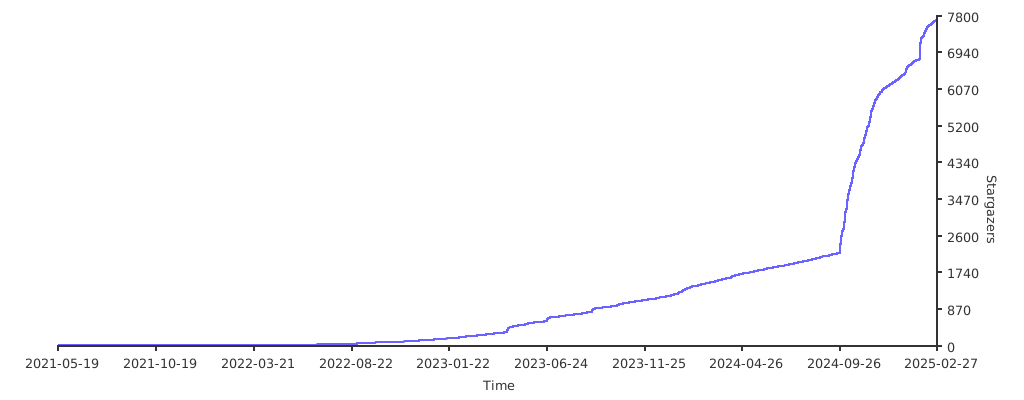
Stargazers over time
English | Español | 简体中文 | 繁體中文 | Tiếng Việt | 日本語
Table of Contents
About The Project

Demo
- Username:admin
- Password:admin
Features
- Online statistics for server indicators such as CPU usage, memory usage, load average, and disk usage.
- Automatic configuration backup after changes, with version comparison and restore capabilities
- Cluster management supporting mirroring operations to multiple nodes, making multi-server environments easy to manage
- Export encrypted Nginx / Nginx UI configurations for quick deployment and recovery to new environments
- Enhanced online ChatGPT assistant supporting multiple models, including Deepseek-R1's chain-of-thought display to help you better understand and optimize configurations
- MCP (Model Context Protocol) provides special interfaces for AI agents to interact with Nginx UI, enabling automated configuration management and service control.
- One-click deployment and automatic renewal Let's Encrypt certificates.
- Online editing websites configurations with our self-designed NgxConfigEditor which is a user-friendly block editor for nginx configurations or Ace Code Editor which supports LLM Code Completion and highlighting nginx configuration syntax.
- Online view Nginx logs
- Written in Go and Vue, distribution is a single executable binary.
- Automatically test configuration file and reload nginx after saving configuration.
- Web Terminal
- Dark Mode
- Responsive Web Design
Internationalization
We proudly offer official support for:
- English
- Simplified Chinese
- Traditional Chinese
As non-native English speakers, we strive for accuracy, but we know there's always room for improvement. If you spot any issues, we'd love your feedback!
Thanks to our amazing community, additional languages are also available! Explore and contribute to translations on Weblate.
Getting Started
Before Use
The Nginx UI follows the Debian web server configuration file standard. Created site configuration files will be placed in the sites-available folder that under the Nginx configuration folder (auto-detected). The configuration files for an enabled site will create a soft link to the sites-enabled folder. You may need to adjust the way the configuration files are organised.
For non-Debian (and Ubuntu) systems, you may need to change the contents of the nginx.conf configuration file to the Debian style as shown below.
http {
	# ...
	include /etc/nginx/conf.d/*.conf;
	include /etc/nginx/sites-enabled/*;
}
For more information: debian/conf/nginx.conf
Installation
Nginx UI is available on the following platforms:
- macOS 11 Big Sur and later (amd64 / arm64)
- Windows 10 and later (amd64 / arm64)
- Linux 2.6.23 and later (x86 / amd64 / arm64 / armv5 / armv6 / armv7 / mips32 / mips64 / riscv64 / loongarch64)
- Including but not limited to Debian 7 / 8, Ubuntu 12.04 / 14.04 and later, CentOS 6 / 7, Arch Linux
- FreeBSD
- OpenBSD
- Dragonfly BSD
- Openwrt
You can visit latest release to download the latest distribution, or just use installation scripts for Linux.
Usage
In the first runtime of Nginx UI, please visit http://<your_server_ip>:<listen_port>
in your browser to complete the follow-up configurations.
From Executable
Run Nginx UI in Terminal
nginx-ui -config app.ini
Press Control+C in the terminal to exit Nginx UI.
Run Nginx UI in Background
nohup ./nginx-ui -config app.ini &
Stop Nginx UI with the follow command.
kill -9 $(ps -aux | grep nginx-ui | grep -v grep | awk '{print $2}')
With Systemd
If you are using the installation script for Linux, the Nginx UI will be installed as nginx-ui service in systemd. Please use the systemctl command to control it.
Start Nginx UI
systemctl start nginx-ui
Stop Nginx UI
systemctl stop nginx-ui
Restart Nginx UI
systemctl restart nginx-ui
With Docker
Our docker image uozi/nginx-ui:latest is based on the latest nginx image and can be used to replace the Nginx on the host. By publishing the container's port 80 and 443 to the host, you can easily make the switch.
Note
- When using this container for the first time, ensure that the volume mapped to /etc/nginx is empty.
- If you want to host static files, you can map directories to container.
Deploy with Docker
-
Then deploy nginx-ui like this:
docker run -dit \
  --name=nginx-ui \
  --restart=always \
  -e TZ=Asia/Shanghai \
  -v /mnt/user/appdata/nginx:/etc/nginx \
  -v /mnt/user/appdata/nginx-ui:/etc/nginx-ui \
  -v /var/run/docker.sock:/var/run/docker.sock \
  -p 8080:80 -p 8443:443 \
  uozi/nginx-ui:latest
- When your docker container is running, Log in to nginx-ui panel with
http://<your_server_ip>:8080/install. If you change the port mapping, access Nginx UI through the host port mapped to container port80instead.
Deploy with Docker-Compose
-
Create a docker-compose.yml file like this:
services:
    nginx-ui:
        stdin_open: true
        tty: true
        container_name: nginx-ui
        restart: always
        environment:
            - TZ=Asia/Shanghai
        volumes:
            - '/mnt/user/appdata/nginx:/etc/nginx'
            - '/mnt/user/appdata/nginx-ui:/etc/nginx-ui'
            - '/var/www:/var/www'
            - '/var/run/docker.sock:/var/run/docker.sock'
        ports:
            - 8080:80
            - 8443:443
        image: 'uozi/nginx-ui:latest'
- Then creat your container by:
docker compose up -d
- When your docker container is running, Log in to nginx-ui panel with
http://<your_server_ip>:8080/install. If you change the port mapping, access Nginx UI through the host port mapped to container port80instead.
Manual Build
On platforms that do not have an official build version, they can be built manually.
Prerequisites
-
Make
-
Golang 1.23+
-
node.js 21+
npx browserslist@latest --update-db
Build Frontend
Please execute the following command in app directory.
pnpm install
pnpm build
Build Backend
Please build the app first, and then execute the following command in the project root directory.
go generate
go build -tags=jsoniter -ldflags "$LD_FLAGS -X 'github.com/0xJacky/Nginx-UI/settings.buildTime=$(date +%s)'" -o nginx-ui -v main.go
Script for Linux
Basic Usage
Install and Upgrade
bash -c "$(curl -L https://cloud.nginxui.com/install.sh)" @ install
The default listening port is 9000, and the default HTTP Challenge port is 9180.
If there is a port conflict, please modify /usr/local/etc/nginx-ui/app.ini manually,
then use systemctl restart nginx-ui to reload the Nginx UI service.
Remove Nginx UI, except configuration and database files
bash -c "$(curl -L https://cloud.nginxui.com/install.sh)" @ remove
More Usage
bash -c "$(curl -L https://cloud.nginxui.com/install.sh)" @ help
Example of Nginx Reverse Proxy Configuration
server {
    listen          80;
    listen          [::]:80;

    server_name     <your_server_name>;
    rewrite ^(.*)$  https://$host$1 permanent;
}

map $http_upgrade $connection_upgrade {
    default upgrade;
    ''      close;
}

server {
    listen  443       ssl;
    listen  [::]:443  ssl;
    http2   on;

    server_name         <your_server_name>;

    ssl_certificate     /path/to/ssl_cert;
    ssl_certificate_key /path/to/ssl_cert_key;

    location / {
        proxy_set_header    Host                $host;
        proxy_set_header    X-Real-IP           $remote_addr;
        proxy_set_header    X-Forwarded-For     $proxy_add_x_forwarded_for;
        proxy_set_header    X-Forwarded-Proto   $scheme;
        proxy_http_version  1.1;
        proxy_set_header    Upgrade             $http_upgrade;
        proxy_set_header    Connection          $connection_upgrade;
        proxy_pass          http://127.0.0.1:9000/;
    }
}
Contributing
Contributions are what make the open source community such an amazing place to learn, inspire, and create. Any contributions you make are greatly appreciated.
If you have a suggestion that would make this better, please fork the repo and create a pull request. You can also simply open an issue with the tag "enhancement". Don't forget to give the project a star! Thanks again!
- Fork the Project
- Create your Feature Branch (
git checkout -b feature/AmazingFeature) - Commit your Changes (
git commit -m 'Add some AmazingFeature') - Push to the Branch (
git push origin feature/AmazingFeature) - Open a Pull Request
License
This project is provided under a GNU Affero General Public License v3.0 license that can be found in the LICENSE file. By using, distributing, or contributing to this project, you agree to the terms and conditions of this license.